Introduction
Even in a digital-first world, cheques remain a trusted and widely used payment method across many industries. From payroll and vendor payments to refunds and official disbursements, cheques continue to play a critical role in business finance. However, manual cheque writing is slow, error-prone, and increasingly risky. This is where cheque printing software becomes essential.
Modern cheque printing software transforms a traditionally manual process into a secure, automated, and professional system. It helps organizations reduce errors, save time, improve compliance, and maintain financial control. This article explains what cheque printing software is, how it works, its benefits, key features, and how businesses use it in real-world scenarios.
What Is Cheque Printing Software?
Cheque printing software is a specialized application that allows businesses to design, print, and manage cheques directly from their accounting or financial systems. Instead of handwriting cheques or relying on pre-printed formats, users can generate cheques dynamically using blank or standard cheque paper.
The software pulls payment data such as payee name, amount, date, and bank details from accounting records and prints them in the correct format, aligned with banking standards. Most solutions also include security features, audit trails, and integration with accounting software.
In simple terms, it replaces manual cheque preparation with an accurate, controlled, and auditable process.
Why Businesses Still Use Cheques
Despite the growth of online payments, cheques remain relevant for several reasons:
Many vendors and institutions still require cheque payments.
Cheques provide a clear paper trail for audits and compliance.
They are commonly used for payroll, tax payments, and government transactions.
Some regions have limited access to digital banking infrastructure.
According to global payment studies, cheques still account for a notable percentage of B2B payments, particularly in developing and regulated markets. As long as cheques exist, the need for efficient cheque management remains.
Key Benefits of Cheque Printing Software
Improved Accuracy and Error Reduction
Manual cheque writing often leads to spelling mistakes, incorrect amounts, or misaligned printing. Cheque printing software eliminates these risks by automating data entry and formatting. Once the data is verified in the system, the cheque prints correctly every time.
This is especially valuable for payroll and high-volume payments, where even a single error can cause delays and disputes.
Time and Cost Savings
Printing cheques manually consumes staff time and requires pre-printed cheque stock. Cheque printing software allows businesses to:
Print multiple cheques in minutes
Use blank cheque paper instead of expensive pre-printed stock
Reduce reprinting and wastage
Over time, these savings add up, particularly for organizations that issue cheques regularly.
Enhanced Security and Fraud Prevention
Cheque fraud is a real concern. Modern cheque printing software includes multiple layers of protection, such as:
Password-controlled access
User roles and approval workflows
Encrypted data storage
Security fonts and background patterns
These controls reduce the risk of unauthorized cheque issuance and internal fraud.
Professional Appearance and Brand Consistency
Printed cheques look cleaner, clearer, and more professional than handwritten ones. Businesses can include logos, standardized layouts, and consistent formatting, which enhances credibility with vendors, banks, and auditors.
Core Features to Look for in Cheque Printing Software
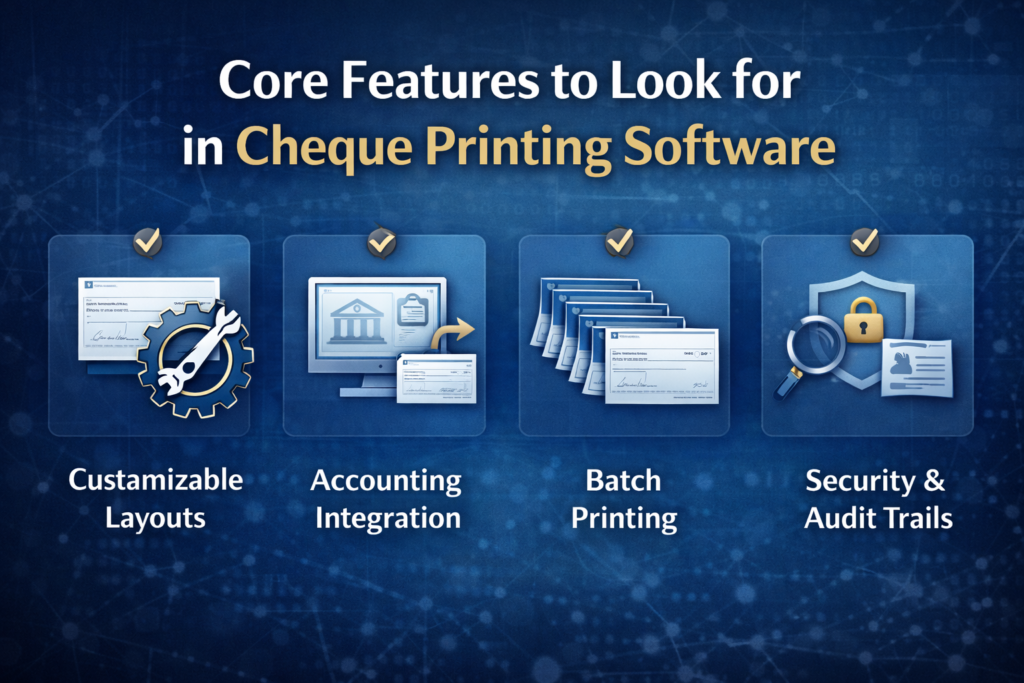
Not all cheque printing solutions are the same. High-quality software typically includes the following capabilities.
Customizable Cheque Layouts
Different banks and regions follow different cheque formats. Good software allows users to customize layouts to match local banking requirements, including:
Cheque size and alignment
Placement of MICR codes
Payee and amount positioning
This flexibility ensures compatibility across multiple banks.
Accounting Software Integration
The best cheque printing software integrates seamlessly with popular accounting systems. This allows payment data to flow automatically, reducing duplicate data entry and improving accuracy.
For example, a finance officer can approve a payment in the accounting system and print the cheque instantly, without retyping details.
Batch Printing and Scheduling
Businesses that process multiple payments benefit from batch printing. Instead of printing cheques one by one, users can print dozens or hundreds of cheques in a single run, saving significant time.
Audit Trails and Reporting
Strong audit features are essential for compliance. Cheque printing software often records:
Who printed each cheque
When it was printed
Whether it was voided or reissued
These records are invaluable during audits and internal reviews.
Real-Life Business Use Cases
Payroll Processing
Small and medium enterprises often use cheques for payroll, especially for contractual or field staff. Cheque printing software enables payroll teams to generate accurate cheques quickly, ensuring employees are paid on time and reducing payroll disputes.
Vendor and Supplier Payments
Procurement departments use cheque printing software to pay suppliers efficiently. With batch printing and approval workflows, finance teams can process large vendor payments while maintaining control and traceability.
Educational Institutions and Nonprofits
Schools, colleges, and nonprofit organizations frequently rely on cheques for grants, stipends, and reimbursements. Cheque printing software helps these organizations meet compliance requirements and maintain transparent financial records.
Compliance and Regulatory Consideration
Cheque printing software supports compliance with financial regulations by enforcing standardized processes. Many systems allow alignment with internal financial policies, such as dual approvals for high-value cheques.
In regulated sectors, this structured approach reduces the risk of non-compliance and strengthens internal controls. During audits, digital records and logs provide clear evidence of financial discipline.
Choosing the Right Cheque Printing Software
Selecting the right solution depends on business size, transaction volume, and regulatory environment. Consider the following factors:
Ease of use and learning curve
Compatibility with existing accounting systems
Security features and access controls
Local banking format support
Vendor support and software updates
A small business may prioritize simplicity, while a larger organization may focus on scalability and advanced controls.
Implementation Best Practices
To get the most value from cheque printing software, businesses should follow a structured implementation approach.
Start with a pilot phase to test layouts and bank acceptance.
Train staff on correct usage and approval processes.
Define clear roles and permissions to prevent misuse.
Regularly review logs and reports to detect anomalies.
Proper setup ensures smooth adoption and long-term benefits.
The Future of Cheque Printing Software
While digital payments continue to grow, cheque printing software is evolving rather than disappearing. Modern solutions increasingly include hybrid features, such as integration with electronic payment systems and digital approval workflows.
This evolution allows businesses to manage both traditional and modern payment methods within a single financial ecosystem, providing flexibility during the transition to fully digital finance.
Frequently Asked Questions
What is cheque printing software used for?
Cheque printing software is used to create, print, and manage cheques electronically, reducing manual work, errors, and security risks.
Is cheque printing software secure?
Yes. Most modern solutions include access controls, audit trails, and security printing features that significantly reduce fraud and unauthorized use.
Can cheque printing software work with blank cheque paper?
Many solutions support blank cheque printing, allowing businesses to save costs and print cheques on demand.
Do banks accept cheques printed using software?
Yes, as long as the cheque format complies with banking standards and includes required security elements.
Is cheque printing software suitable for small businesses?
Absolutely. Small businesses benefit from faster processing, professional presentation, and reduced administrative effort.
Conclusion and Call to Action
Cheque printing software offers a practical, secure, and efficient solution for businesses that still rely on cheque payments. By automating cheque creation, improving accuracy, and strengthening financial controls, it transforms an outdated process into a modern workflow.
Whether you manage payroll, vendor payments, or institutional finances, adopting the right cheque printing software can save time, reduce risk, and enhance professionalism. Now is the time to move away from manual cheque handling and embrace a smarter approach to financial management.